

A lot of properties with manual read submeter systems assume that getting real-time data means starting over. They picture replacing every meter, every transceiver, and absorbing a full installation cost on top of it. That assumption keeps a lot of properties stuck with a clipboard-and-paper process that creates billing errors, delays data, and misses leaks for weeks at a time.
In most cases, you don’t need to replace everything to get automated meter reading (AMR). What needs upgrading depends on what’s already in place, and the answer is different for every property. Sometimes it’s the gateway. Sometimes it’s the transceivers. Sometimes it’s the meters themselves. Often it’s a combination, and typically less disruptive than you’d expect.
A submeter system has four distinct layers and each one ages on its own timeline. Knowing which layer is causing the problem is what separates a targeted upgrade from an unnecessary full replacement.
Understanding What a Submeter System Is Made Of
Understanding how each layer functions and how it ages is what allows a property to upgrade strategically rather than replacing everything at once.
The meters
The meters themselves are the most durable layer. A well-maintained multi-jet mechanical meter lasts 8 to 12 years. An ultrasonic meter can run accurately for 15 to 20 years or more. If your meters are within their expected lifespan and reconciling correctly against the master meter, they likely don’t need to be replaced. Our post on how often submeters should be replaced covers the decision framework in detail.
The transceivers
Wireless transceivers attached to each meter are the communication link between the meter and the rest of the system. Battery life varies by model but typically runs 5 to 10 years. A transceiver that’s failing or dead shows up as a zero-read on the platform, which creates billing gaps and missed leak detection. Before any gateway upgrade, the transceiver layer needs to be assessed. Adding a gateway to a property with failing transceiver just moves the problem upstream.
The gateway
The gateway is the central hub that collects data from all the transceivers on the property and sends it to your monitoring platform. For properties currently on manual reads or older 3G systems, the gateway is almost always the highest-leverage upgrade. It’s the layer that turns a passive meter system into a live, data-generating tool. In most cases it can be added without touching the meters or transceivers at all.
The platform and billing software
The software layer is what your team actually uses: the dashboard, the reporting tools, the alert configurations, and the billing integration. An upgrade to the gateway often comes with a platform migration as well, particularly for properties moving from an older AMR system to the NextCentury platform. This is also where properties that have been locked out of their own data by a billing company finally get direct access to their system.
Why the Gateway Is Usually the Right First Move
Of the four layers, the gateway is where most properties have the biggest gap between what their system could be doing and what it’s actually doing. Meters and transceivers are often in perfectly good shape. The platform is ready to receive data. The missing piece is the device that bridges them.
The most common scenario Integrity Meter encounters is a property with working meters and functional transceivers that’s still being read manually once a month. The hardware is doing its job at the unit level. What’s missing is the collection layer: the gateway that pulls all that data together wirelessly and delivers it to a platform where the team can act on it.
Manual reads create a gap. Anything that happens between visits, a toilet running for three weeks, a transceiver that goes dark, a unit showing dramatically higher consumption than the month before, doesn’t surface until someone walks the property. By then, the waste has already accumulated and the billing cycle has already closed.
Adding a gateway closes that gap without touching the meters. For properties with transceivers already in place, it’s the most cost-effective path to real-time monitoring, and it typically disrupts the property far less than a full system replacement would.
How the Gateway Retrofit Works
A gateway retrofit connects the communication hub your transceivers have been waiting for. Here’s how Integrity Meter handles the process from start to live data:
Site assessment first, equipment second
Before anything is ordered, Integrity Meter assesses what’s already in place. Which transceiver brand and protocol is on the property. Whether transceivers are communicating correctly or showing signs of battery failure. Whether the property has a mixed-brand setup that needs a compatibility solution. This step determines which gateway is right and whether any transceiver work needs to happen alongside the gateway installation. Skipping it is how properties end up with hardware that doesn’t talk to each other.
Installation and network configuration
The GW4 connects via Ethernet, WiFi, or built-in 5G cellular, whichever is most reliable at the property. Once it’s live, Integrity Meter registers every transceiver to its unit in the platform, verifies that each one is reporting correctly, and configures the monitoring software for your property’s specific needs. For a property that’s been on manual reads, this is often the first time the team has seen their full meter set communicating in real time. It tends to surface a few things that manual reads were missing.
Commissioning and handoff
The install isn’t done until every meter is confirmed communicating and your team knows how to use the platform. Integrity Meter provides direct dashboard access, configures your alert thresholds, and queues your first high-low consumption report. Properties that have been locked out of their own data by a previous billing company are consistently surprised by how much information they now have available. The goal is that your team is operating the system independently from day one, not waiting on a vendor to interpret data that belongs to you.
The NextCentury GW4: What It Supports
The gateway Integrity Meter leads with for retrofit upgrades is the NextCentury GW4 5G Cellular Gateway. It’s purpose-built for this application: a property with existing wireless transceivers that needs a central collection point and a path to real-time data without a full system replacement.
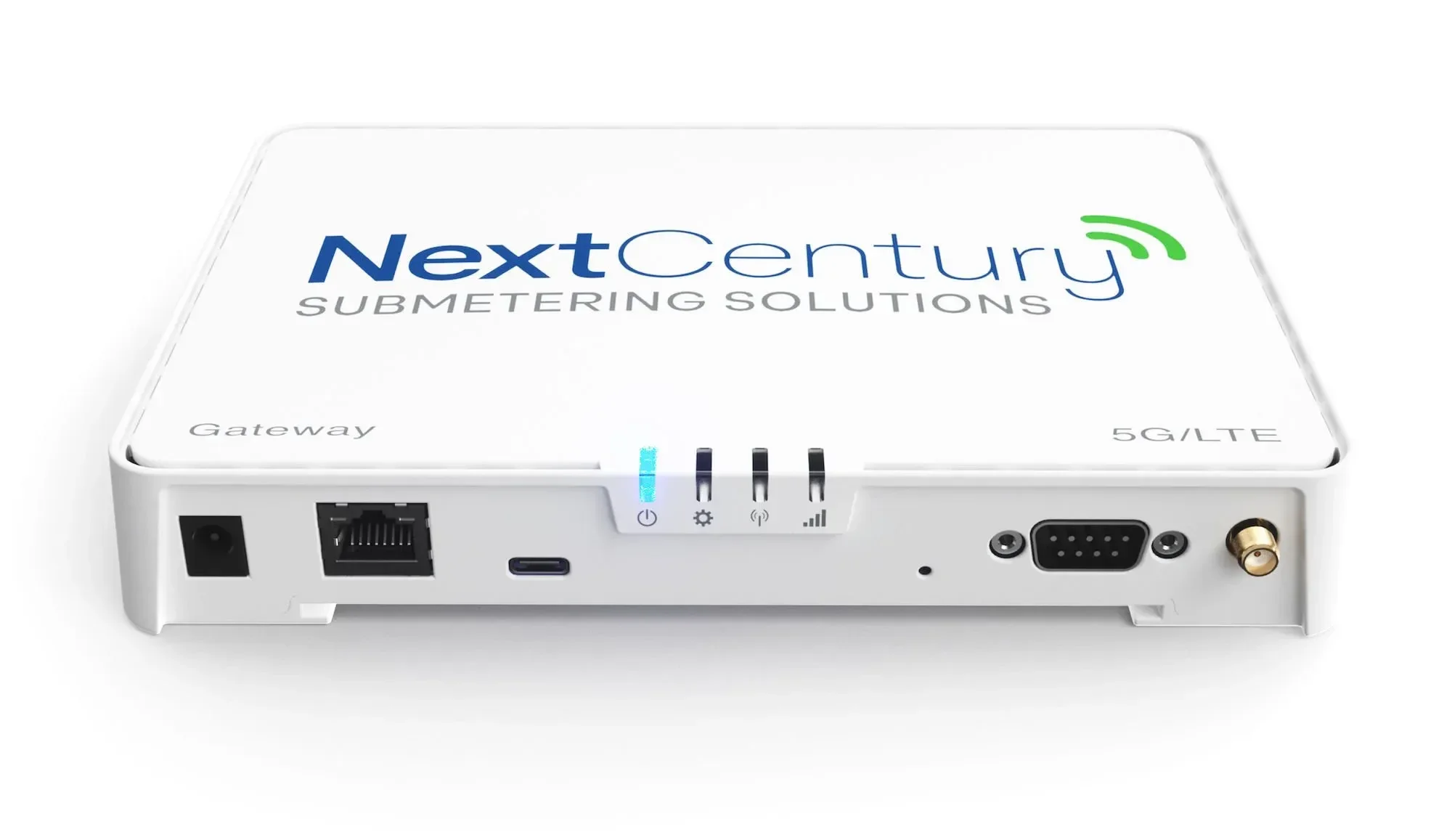
What makes it well-suited to retrofits specifically:
Plug-and-play setup with no complex infrastructure required on the property side
Connects via Ethernet, WiFi, or built-in 5G cellular, which matters for properties where a hardwired connection isn’t practical
Supports thousands of wireless devices on a single property, so it scales with the property rather than against it
Cloud-connected from day one, which means your usage data is accessible remotely without a site visit
For smaller properties or those with tighter budgets, the GW4 Lite at $1,299 covers the same core functionality at a lower entry point. The full GW4 at $1,999 is the right call for larger properties or those that anticipate adding more devices over time.
The Inovonics Compatibility Scenario
One of the most common retrofit situations Integrity Meter works with is a property that has Inovonics receivers already in place alongside NextCentury equipment, or one that wants to move to the NextCentury platform without replacing Inovonics hardware that’s still working correctly.
The NC Gateway Connection Cable for Inovonics Receiver bridges that gap directly. At $50, it connects existing third-party data receivers to the NextCentury gateway, allowing the property to bring its Inovonics infrastructure onto the NextCentury platform without a full hardware replacement. The TapWatch system, for example, is fully compatible with previously installed EchoStream receivers via this cable.
This is the kind of detail that gets missed when a billing company isn’t an equipment specialist. A property with a mixed system gets told it needs to replace everything when in most cases a $50 cable resolves the compatibility issue entirely. Knowing which scenario applies to your property is exactly what our site assessment covers before any equipment is purchased.
Signs Your Property Is Ready for a Gateway Retrofit
A gateway retrofit makes sense when most of the following apply to your property:
Your meters already have wireless transceivers attached
You’re currently on a manual read schedule, monthly or less frequent
You’ve had billing disputes tied to estimated reads or delayed data
Leaks have gone undetected between read cycles
Your billing company doesn’t provide real-time alerts or usage reports between billing cycles
Your system is on an older 3G network that’s no longer supported or being phased out
If your transceivers are old enough that their battery life is a concern, that’s a separate conversation from the gateway upgrade. Integrity Meter would assess the transceiver condition as part of the site review and flag any that need replacement before the gateway goes in. Adding a gateway to a system with failing transceivers just moves the problem rather than solving it.
What Changes After a Gateway Is Live
The operational shift after a gateway goes live is immediate. A property that was getting one set of reads per month is suddenly getting continuous data from every unit. The difference in what you can do with that data shows up within the first billing cycle:
A running toilet flags within days instead of running for a full billing cycle
A transceiver that goes dark shows up as a zero-read alert rather than a billing gap that only surfaces when someone questions their invoice
High consumption reports go out automatically, giving your team the information to act before it becomes a tenant complaint
Billing data is accurate and current rather than estimated or lagged
In a recent Integrity Meter case study, active system management drove an 80.6% reduction in water consumption on a 17-unit property within three months of switching to real-time monitoring. The gateway is what makes that level of management possible. Without it, your billing company is working with month-old data and so are you.
How Integrity Meter Handles Retrofit Upgrades
We start every retrofit conversation with a site survey rather than a product recommendation. The right gateway and the right configuration depend on what’s already in place, and guessing at compatibility is how properties end up with hardware that doesn’t work together.
Our team holds NextCentury Certified Installer credentials and has hands-on experience with the full range of transceiver brands and configurations that show up in the field: Inovonics, EchoStream, NextCentury, and others. We know which combinations work, which need an adapter, and which require a different approach entirely. That knowledge is what a site assessment puts to work before anything is ordered.
Once the gateway is live, we don’t hand you a login and disappear. Retrofit upgrades are covered by our ongoing submeter maintenance service, which means we’re watching the data alongside you and flagging anything that needs attention before it becomes a problem.
Frequently Asked Questions
Can I add a gateway to my existing submeter system without replacing the meters?
In most cases, yes. If your existing meters have wireless transmitters attached and those transmitters are still functional, adding a gateway is the only hardware change needed to move from manual reads to real-time AMR data. The meter stays in place, the transmitter stays in place, and the gateway becomes the piece that finally connects them to a live monitoring platform. Integrity Meter’s site assessment confirms compatibility and transmitter health before any equipment is ordered, so there are no surprises on installation day.
What if my property has Inovonics receivers and I want to switch to Next Century?
This is a common retrofit scenario and in many cases it’s solved with the NC Gateway Connection Cable at $50. The cable connects existing third-party receivers to the Next Century gateway, allowing the property to move to the NextCentury platform without replacing working Inovonics hardware. Compatibility depends on the specific receiver model, which we confirm during the site assessment.
What is the difference between the GW4 and the GW4 Lite?
Both gateways connect via ethernet, WiFi, or built-in 5G cellular and deliver real-time data to the NextCentury platform. The GW4 at $1,999 is the full-capacity version suited for larger properties or those expecting to add devices over time. The GW4 Lite at $1,299 covers the core functionality at a lower entry point and is well-suited for smaller properties.
My property is on a 3G network. Do I need to upgrade?
If your system relies on 3G cellular connectivity, it’s already on borrowed time. The major carriers have substantially shut down 3G networks, and any system still depending on it is either limping along on a fallback connection or not transmitting at all. The gap between what the system should be reporting and what it actually is reporting often goes unnoticed until a billing dispute forces someone to look. A gateway upgrade to the GW4 moves your system to 5G cellular and closes that gap permanently.
How long does a gateway retrofit take?
For most properties, the physical installation is completed in a single visit. Configuration and commissioning, which covers registering each meter to the platform, verifying data transmission across the full meter set, and setting up reporting and alerts, typically happens the same day. The site assessment before installation is what ensures there are no surprises when the team arrives.
What if some of my transmitters are failing? Should I still upgrade the gateway?
Integrity Meter would recommend resolving transmitter issues before or alongside the gateway installation rather than after. A gateway retrofit is most effective when the transmitter layer underneath it is solid. During the site assessment, transmitter health is evaluated across the property and any that need replacement are flagged so the full system is in good shape when the gateway goes live.
Ready to find out which layer of your system actually needs upgrading? Schedule a site survey and Integrity Meter will assess your transceivers, confirm gateway compatibility, and give you a clear path forward before anything is purchased.
